Resources · 65
Social video: prepare captions, transcripts and alternatives
Plan useful information before editing, review captions and check that sound, visuals, cropping and translation preserve meaning.
· 3 min
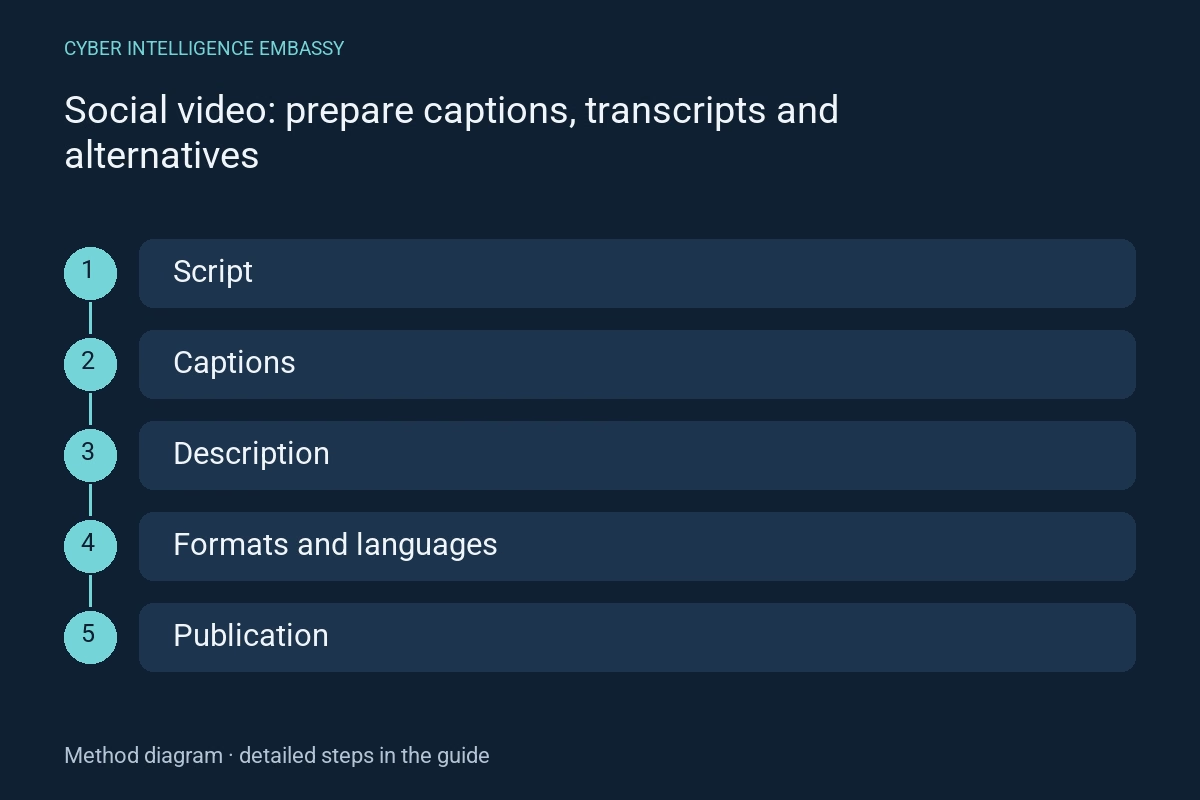
What this guide helps achieve
- Plan an accessible script
- Review captions
- Describe useful visuals
- Adapt without losing meaning
Quick check
- Are automatic captions sufficient?
- Can a transcript always replace captions?
- Must every visual detail be described?
Step-by-step method
- 01
Plan an accessible script
List speech, useful sounds and information conveyed only visually. W3C distinguishes captions, transcripts, visual description and accessible players. Planning these needs before recording supports coherent alternatives.
Deliverable: script and information to convey.
- 02
Review captions
Correct names, numbers, negations and speaker changes. Include sounds needed for understanding. Check timing and legibility; unreviewed automatic transcription may change meaning.
Deliverable: approved, versioned track.
- 03
Describe useful visuals
When a demonstration conveys a step without speech, provide a suitable explanation in the script, audio description or descriptive transcript. Speech captions alone do not describe all visual information.
Deliverable: alternative for visual information.
- 04
Adapt without losing meaning
Check vertical crops, text covered by interface overlays and sizes actually seen on mobile. Review each language against the edit. Captions burned into pixels do not automatically become an usable text track.
Deliverable: acceptance per format and language.
- 05
Check publication
Inspect the final-channel video with and without sound. Check available track activation, transcript access and disclosure legibility. If the player imposes limitations, offer an accessible alternative and state the limit.
Deliverable: published URL, evidence and corrections.
Reusable worksheet
Complete with your authorised observations. These fields are a working template, not observed results.
| Field | Information to record |
|---|---|
| Content | Speech, sounds and visual information |
| Alternative | Track, transcript and description |
| Version | Language, edit and approval |
| Publication | URL, player, limit and correction |
Worked example
Illustrative situation
Fictional example: a video shows a button to select, while narration merely says “here”.
Decision and expected evidence
The script names the button and the transcript describes the step; captions are checked again after vertical editing.
Distinguish the mechanisms
| Mechanism | Purpose | Check or limitation |
|---|---|---|
| Captions | Convey speech and useful sounds | Check timing and speakers |
| Descriptive transcript | Provide a complete textual version | Include necessary visual information |
| Audio description | Convey visual information through sound | Choose a form matching the content’s pace |
Management indicators
| Indicator | What it measures | First action |
|---|---|---|
| Reviewed tracks | Versions checked before publication | Inspect meaning and timing errors |
| Checked formats | Crops actually published | Inspect obscured text and small screens |
| Accessible alternatives | Information without an imposed modality | Test task comprehension |
Common pitfalls
- Check timing and speakers
- Include necessary visual information
- Choose a form matching the content’s pace
Frequently asked questions
Are automatic captions sufficient?
They can be a draft. Review names, numbers, negations, speakers and useful sounds.
Can a transcript always replace captions?
No. Needs differ; separate text does not necessarily support synchronized viewing.
Must every visual detail be described?
Describe information needed for understanding and the task. Decorative scenery differs from a demonstration step.
Official references
References consulted on 2 October 2026. The method and worksheet propose checks to adapt to your context; they do not constitute certification.
Continue exploring
Related analysis